ShredderFeeder@shredderfood.net to Selfhosted@lemmy.worldEnglish · 4 months agoAddiction....shredderfood.netimagemessage-square25linkfedilinkarrow-up14arrow-down10file-text
arrow-up14arrow-down1imageAddiction....shredderfood.netShredderFeeder@shredderfood.net to Selfhosted@lemmy.worldEnglish · 4 months agomessage-square25linkfedilinkfile-text
minus-squareJankatarch@lemmy.worldlinkfedilinkEnglisharrow-up1·4 months agoIs there any advantage of using du over df for this?
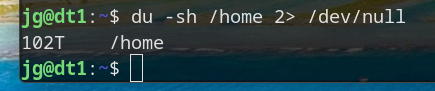
minus-squareEphera@lemmy.mllinkfedilinkEnglisharrow-up1·4 months agodf only shows partitions, whereas du adds up the file sizes in the directory you specify. So, in particular, if you want to find out what’s taking up so much space, you can repeatedly run du -sh * and cd into the largest directory.
minus-squareHelix 🧬@feddit.orglinkfedilinkEnglisharrow-up1·4 months agoOr you run ncdu and save some keystrokes.
minus-squarebitjunkie@lemmy.worldlinkfedilinkEnglisharrow-up1·4 months agoSomeone may eventually write CLI programs called hast and mich that you can somehow usefully pipe to it
minus-squareanon_8675309@lemmy.worldlinkfedilinkEnglisharrow-up1·4 months agoYeah it lets you have time to get some tea while it works.

Is there any advantage of using
duoverdffor this?dfonly shows partitions, whereasduadds up the file sizes in the directory you specify.So, in particular, if you want to find out what’s taking up so much space, you can repeatedly run
du -sh *andcdinto the largest directory.Or you run
ncduand save some keystrokes.Someone may eventually write CLI programs called
hastandmichthat you can somehow usefully pipe to itYeah it lets you have time to get some tea while it works.