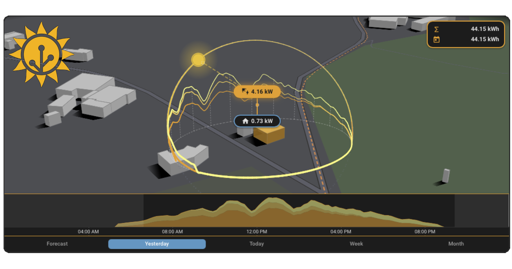

The illustrator seems to be referenced at the bottom of the blog post Owen Yeconiel, but I don’t know how much it would cost. An artist friend suggested it might be in the few thousands when considering layering and various illustrations.



The illustrator seems to be referenced at the bottom of the blog post Owen Yeconiel, but I don’t know how much it would cost. An artist friend suggested it might be in the few thousands when considering layering and various illustrations.

I’ve been a customer of SoYouStart, now the OVH Eco series for many years. For $30/mo, I get 32GB of RAM and 480GB of disk space. Plenty of space for me to run my too many different services.
I’ve found them cost effective


For inbound, I use Postfix + rspamd + dovecot directly to my server. Outbound, I used to send it directly from my server. I did this 15+ years with DKIM, DMARC, and SPF. It worked well for like 95% of the emails I sent, but I started relaying through smtp2go.com after I had just a couple really important emails not get delivered or me not be sure if the recipient saw them.


Yeah it’s useful and I’ve been using it for my home lab, but too many of my containers want outbound connections to the Internet. Like Forgejo needs :443 to be able to mirror or remote push repositories, so either I have to identify and allow list github.com, gitlab.com, etc. or end up allowing 0.0.0.0/0:443 which is not very strong protection.
I’d love for some kind of CNI or network plugin that filtered based on domain name.


Since you’re using Kubernetes, have you looked at external-dns? In my home lab, I use external-dns to take Ingress and Service resources and register them into my internal DNS zone. I use the etcd backend. external-dns registers zones in etcd, then CoreDNS queries from etcd. As soon as I create a new Ingress, it’s automatically registered and pointing to my Traefik service.
https://github.com/kubernetes-sigs/external-dns/blob/master/docs/tutorials/coredns-etcd.md


It’s a small model that runs on your machine using a TFLite model. AI/ML models come in many different sizes. Some more conducive for running locally than others. There’s more info on the detection pipeline here.
I didn’t write this, just found and self hosted it.


Nice. What kind of microphone setup do you have? I’m just starting with security cameras because I have those, but the audio quality is ehh.


Looks like it only applies to Home Assistant OS which would be a dedicated machine/VM, not container or other installation strategies.
EDIT: The internal listen port is still 8123: https://github.com/home-assistant/core/blob/938a78275e9a858a0364fe13390d2f583f70ebe4/homeassistant/const.py#L970
I looked quickly, but didn’t see an answer. Does Sure.am let you download your transactions into something like Actual or Firefly-iii or is it all within the hosted platform? I saw an option to self host, but didn’t see the integrations.
I’m trying to find something to pull into my firefly-iii instance and am currently abusing the Monarch API but it has some issues. I also wrote my own scrapers but they are fragile and I’d rather just integrate directly with plaid.


Connecting the wires is a little finicky at times, but I used a pogo pin clamp which had the right pitch size to make it easy to connect and avoid soldering. Once you get it on ESPhome the first time, you can keep OTA updating new firmware


I installed an Emporia Vue2 flashed with ESPHome in my home breaker box and put CT clamps on all my circuits which makes installing this integration easy.
This integration is pretty well polished and was much more polished than my simple crossing trigger I had before.
Just started using it so it hasn’t learned any cycles yet.


Fair comment. Fixed the title to solar power system.


Agreed. As a software dev, a huge portion of my job has been fixing exception handling and adding centralized error handling to figure out what bugs my users are experiencing. Many devs I worked with seemed to only care about the happy path.


You can buy a Home Assistant hub which is a raspberry that comes with Home Assistant on it. It’s designed to be mostly plug and play, but isn’t near the simplicity of SmartThings yet.
Once it’s setup, a lot of devices can be just added and go. I’ve got my LG TV added and can turn it on, off, change inputs, etc. I have way more powerful automations and more devices on HA than I ever could on SmartThings.
Depends on your comfort level and interest level


Jellyfin does not handle NAT punching automatically to point that a non technical user can install an app on their TV, see one or more libraries, and connect to my server across the Internet. This is the biggest problem that Plex solves compared to Jellyfin. I can’t expect my parents to install Tailscale or make any changes to their network.
That being said I use Jellyfin. I just don’t share it with my friends.


I respect your strong ethics and sticking to them, but saying they people support genocide for using software hosted on GitHub is an extreme position.
I could easily change this: Do you drive a car or fly a plane? Then you must have no red lines against climate change.
Yes, I run Ollama on a NVIDIA 1080 Ti at home. I run granite4:3b for my Home Assistant assistant for my voice assistant, paperless-ngx, OpenWebUI for chat, and a few other things. For speech to text, I run a custom-built hybrid speech-to-phrase + parakeetTTS (requests that match speech-to-phrase take priority over parakeet.) I run GOModel to route requests to my local Ollama instance, or DeepInfra (cloud-based for larger models), or Tinfoil (cloud-based for encrypted LLM chats.)
As much as I love to use local-everything, only my smarthome+basic chats go local. Trying to fit both the STT and LLM models on the same GPU at the same time while also using this computer as a media console is challenging. I’ve recently started looking at the Hailo m.2 accelerator board to see if I can shift the STT to it.